Hello, it has been a while, today I bring good news!
First a bit of background, I am Jean Lima Andrade, a second year student of IFBA (Federal institute of Bahia), last year I have participated on SoK 2020 and GSoC 2020. You may know me from my previous posts.
On this Season of KDE, I will be adding support for audio annotation on marK. This year, Pranav, a fellow SoK student, will also add video annotation support, I will be mentored by Caio Jordão Carvalho alongside Tomaz Canabrava. I look forward to work with all of them.
Hello! This is the post about my week 12 and, probably, also my final post for GSoC 2020.
You can see my Merge Request in regards to the support of text annotation here. Today I will talk about what I have done this week and also show the progress of marK so far near the end of GSoC.
I have implemented and fixed what I mentioned in the previous post and there are more commits that I want to highlight:
A small change (only two lines) that prevents a bug that can happen when the user is annotating data with a mouse click and move and the current polygon pass over an existing polygon, now it is not allowed to do so.
This should make the life of the users easier if they need to annotate a single word per entity, with the speed of only a double click, also you can achieve the same behavior (select a whole word) clicking in a sentence that has only one letter.
Previously the container of annotation (aka Container) overridden functions to treat mouse events like mousePress, mouseMove, mouseRelease, and (recently) mouseDoubleClick, now it uses an eventFilter that treat those mouse events. This implementation will handle mouse events in any Widget as long as this eventFilter is installed on it (or its viewport) making it work pretty well with the painters structure.
This one is an improvement of a previous commit, Create a new painter instance just when needed, now marK has a more robust way to treat the changes of the working painter, and it will be easier to add and modify the buttons on the left of the Container labeled as “Options”, this is nice to have as marK in the future will support other types of annotation (such as audio and video) and those may need specific UI items.
Now marK shares more similarities with other KDE projects using KF5 (more specifically KXmlGuiWindow). This gives to marK some of the hackability found in them (e.g. now you can change the default shortcuts if you want) and it is also easy to have a pretty help and settings menu.
Now, I had like to show some features of marK that made into the main branch during this GSoC period, or will have after the MR is merged:
Summarizing:
use temporary files to load annotation made before switching to another item (made into the main branch)
autosave functionality (made into the main branch)
support to mouse click and move to annotate data (and double click for text annotation)
painters (see week 4 and 5, if you do not remember about it)
use of KDE Frameworks 5
support to text annotation
There is still some work that needs to be done but I am already happy to show this development (and I will be even happier after the code is merged : ).
Thanks
In these months of GSoC, I have received help from Tomaz Canabrava, Sandro Andrade, and, the one that helped and guided me the most, my mentor Caio Jordão Carvalho, I am very grateful and thankful for it. I had like to thank you all for the attention and opportunity, I hope that I didn’t let you down. 🙂
What is next after GSoC? I am already talking with Caio and we are planning some cool things to make marK better, expect more posts and news 😉
When changing the working directory and the current painter was the textPainter, the TextEdit instance would not be closed properly, thus not behaving as it should, as the imagePainter is the default in the containerWidget (widget where data annotation is made) when there is no item opened.
Example of how the polygon and the rectangle mode are behaving now with the mouse click and move event.
Like I have said in the previous post, I have added support for the mouse move event when annotating data. With this, a bug was introduced when mouse click and move happened in the rectangle mode (a bunch of mini rectangles would be created instead of just adjusting one, as in the example shown above).
With the new logic of the painters, this bug was introduced again, in the past, marK had this problem with images bigger than 1280X960 (that I solved in SoK 2020). To solve this, I used a second vector that contains temporary objects adapted to the containerWidget, and the main vector, which also contains annotation data, will have the correct values meant to be saved. This means that image annotation is now working properly again.
I have improved the logic of text annotation, now the code is more maintainable and works like the imagePainter, creating new MarkedObjects (the class that represents annotation data) just when it is needed, saving the annotation data just when it is understood that it is already complete (mouse release), thus avoiding some saving (like always triggering the autosave functionality as before) and deleting operations that may affect the performance. A bit later I improved it further, fixing one case where the end of current text selection is at the beginning of another causing the latter to disappear and improved the readability of the code.
What is next? There is still one part of the code that I trying to improve in regards to text annotation, currently, it is not possible to use the wheel to navigate through a document that is big enough to not fit in the whole containerWidget, this is a bug that I want to solve, I also will improve (and add) options to the menu of marK to its first release.
In these three weeks I have been working in bug fixes and the logic to handle text annotation. It is worth mentioning one change in the original plan, I said in the previous posts that I was going to use KTextEdit, but for now, the code is using QTextEdit that is already available by using Qt and I could focus on the logic.
In the first day of the coding period I made a post that explained a bit about text annotation, now here are two examples that are already possible to do in marK:
Named Entity Recognition
Phrase Chunking
Using the 3 first lines of the example in brat’s screenshot of the aforementioned post.
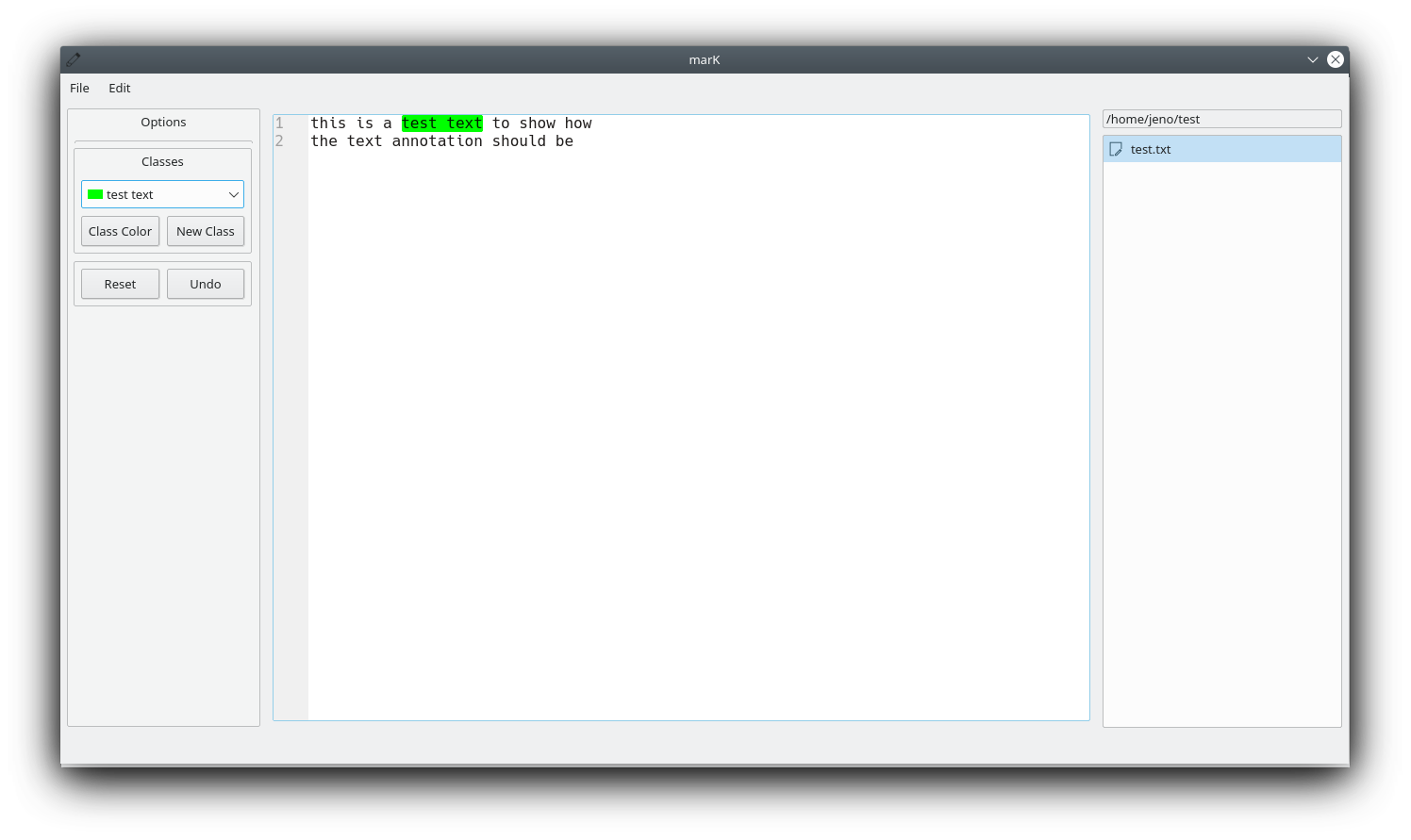
Example of current usability
In this video I am doing named entity recognition annotation.
Above is a short video that I made to show the current state of text annotation in marK, near to the end, you can also see the file generated that contains the annotation data (a JSON file in this case).
This coding period was quite challenging, but also fun, I have learned a lot as I was implementing the logic to handle text annotation. Also, as you could see in the video, now it is possible to annotate data with mouse click and drag instead of only clicking, I think it will improve the user experience, making marK more comfortable to use, and it is not only limited to text annotation, image annotation supports it too.
What is next? I will fix the bugs that I found, improve the UX, make the code more performant and, together with my mentor, prepare marK to have his first release.
Hi, today I will talk about my week 4 and week 5 and bring some news!
The last post was short but this one will make up for it, explaining some important bits, and changes, in the structure of mark that changed/improved during the first month of coding in GSoC.
In week 4, I documented a huge part of the existing code, although there is still a need for some updates. Currently in week 5, I am fixing some bugs of the new logic and I will document the newly created Painter class (more information below), also start developing the logic for text annotation.
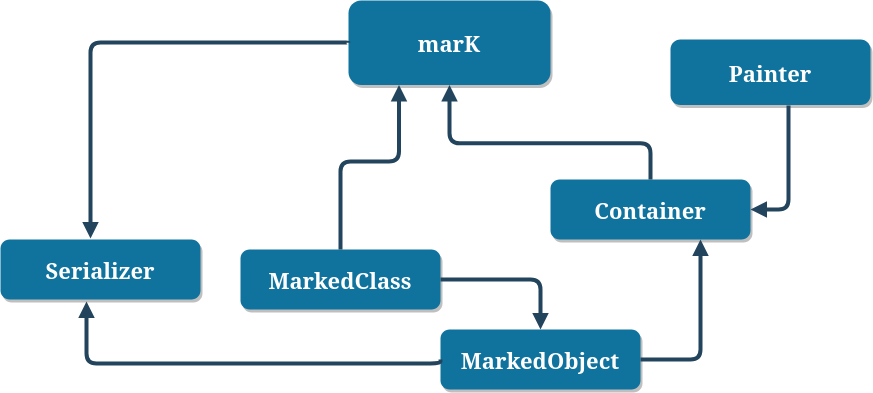
The structure of marK had some changes that I had like to highlight and explain. this diagram represents the current structure, with marK also being the main window class.
Current relationship of classes.
Container was an abstract class and its children handled the loading of the necessary items, such as the image for the previous ImageContainer and text for the to be TextContainer, and also annotate the data. After talking with my mentor, we decided that it could change for better and be simpler.
Now marK has only one Container, this one is a “canvas” to the Painter and he will be switched accordingly to the file type, the painters now are the ones responsible for load and display the contents of the files, and also handle the annotation of data.
The container holds the current MarkedObject being annotated and also a vector of the previous ones. With this change the code is smaller and it is easier and faster to change between different types of annotation.
Children of MarkedObject, each one represents, respectively, audio, image (and video) and text annotation.
MarkedObject represents the annotated data. Each MarkedObject has a reference of a MarkedClass, and use it to have a color and identifier for the annotation. It also uses d pointer to avoid problems related to ABI changes (as I said in the previous post).
The existing markedClasses are shown in the marK’s comboBox, being possible to select and also modify the name identifier and color. Allowing the user to personalize and edit accordingly to his needs.
Serializer is responsible for reading and saving the MarkedObjects resulted from the annotation in marK. Its functions have been refactored to support text annotation (and others types of annotation). Currently, serializer only exports to two file formats, xml and json.
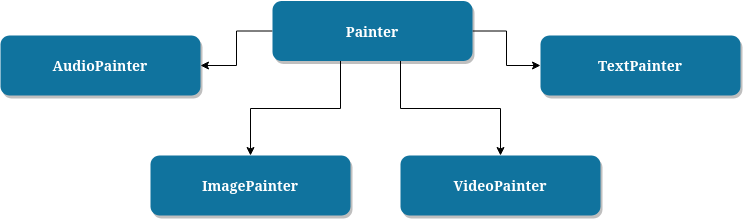
Existing and futures children of Painter.
Painter is the base class of all Painters and is friend of the Container, as said before, it takes over the responsibility of the containers (of the previous logic). There will be a derived class for each type of annotation (such as the ones shown above). Currently, only ImagePainter exists and works but this month I will develop the TextPainter and change this.
In the next post I will explain about the TextPainter and show the initial text annotation in marK.
Hi! This is my report of the weeks 1, 2 and 3 of GSoC 2020.
First of all, sorry for taking a while to write the first post of the coding period, before writing I was making sure that everything was working properly and that I hadn’t broken anything, well now lets go to the actual report.
I have fixed the build errors of marK and merged the code of the branch of SoK 2020 that had yet to reach master, !2 . Also I started the implementation of text annotation.
Unfortunately I have nothing visual to show has the modifications do not change anything GUI-related, but there are things worth mentioning:
Use of opaque pointers, this is an important step for plugins support in the future.
Migrated the image annotation to its rightful place and separated it from the core of marK.
Improved the logic of the class that write/read annotation data to/from json and xml files.
Hello! As I said in the previous post I will be posting in this blog about my experiences in GSoC 2020 (if you do not know about it, see my first post).
Community bonding period has ended and officially the coding period begins now. This is my second (and late) post and I will talk about one of my main objectives in this project, text annotation, but first a little introduction:
In a supervised learning stage, data annotation is indispensable to machine learning models, so it can learn to recognize predetermined patterns and the algorithm can treat new, non-annotated data and successfully do its task. marK is a machine learning dataset annotation tool that aims to facilitate the important process of annotating data.
Text annotation
Text annotation, one type of data annotation, is the task of labeling text-based data. The acquired metadata make possible to train the learning model to recognize patterns to tackle a huge set of problems and niches. It has a bunch of fields, each one meant to a specific niche/objective, such as:
Phrase chunking
Image from brat, an open source text annotation tool
Phrase chunking consists of labelling parts of the text according to their grammatical meaning such as noun, verb, adjective, adverb and prepositional phrase, abbreviated as NP, VP, ADJP, ADVP and PP, respectively.
Named entity recognition
Image from doccano, an open source text annotation tool
Named entity recognition (NER) represents a named entity in the text, these entities are labelled with predetermined labels such as corporation, localization, person, etc. Used to discern and recognize selected entities in a text.
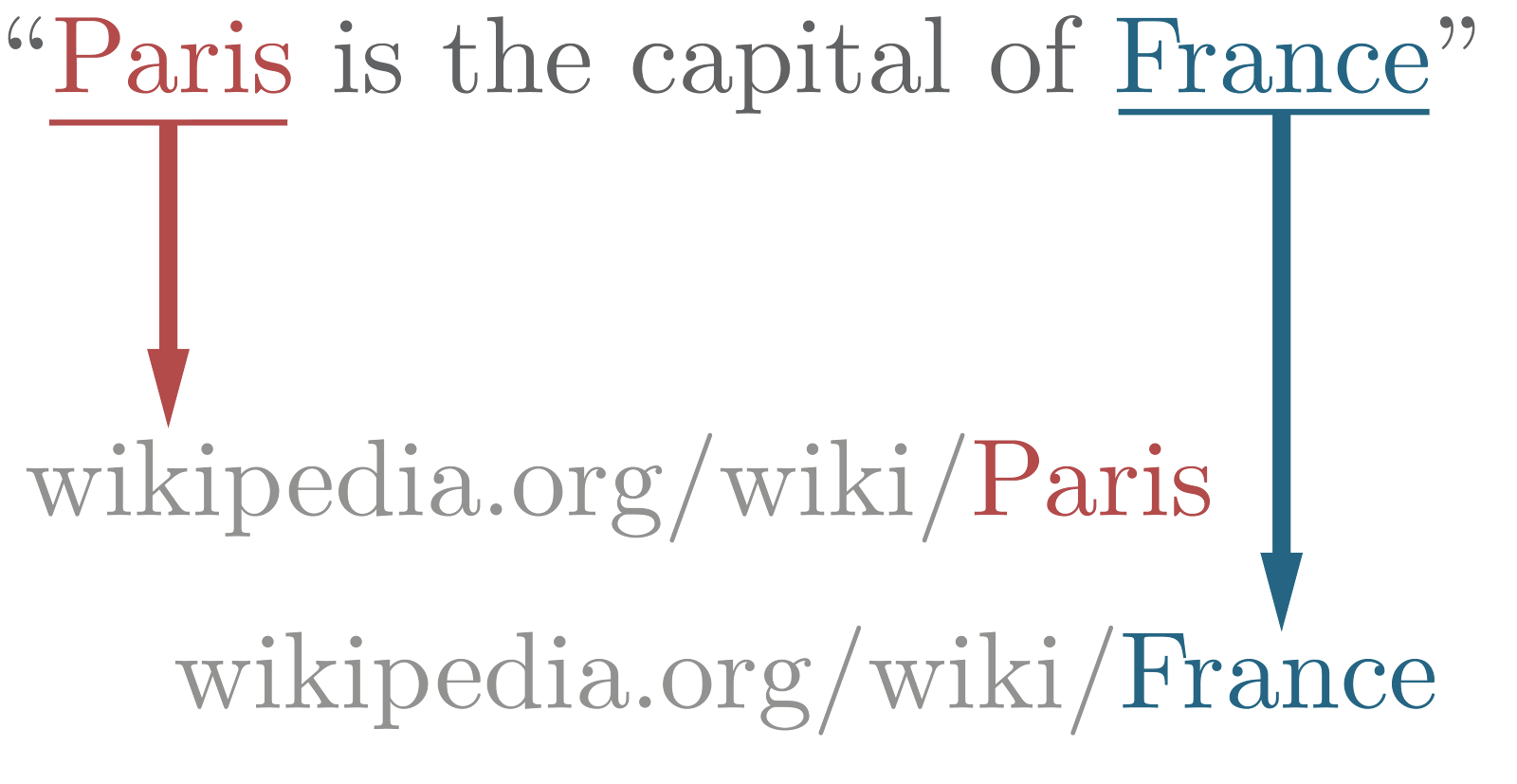
Named entity linking
Named entity linking (NEL) is used along side with named entity recognition, its task is to link entity mentions to a corresponding entity in a external knowledge database such as Wikipedia.
By no means this was an exhaustive list, it is meant to list some possibilities of text annotation.
How text annotation should be like in marK
As of how the graphical interface should become I am still not sure, while I studied tools of text annotation for machine learning I perceived that it has a lot of potential to be better than I previously thought. Text annotation in marK should be as flexible as possible allowing the user to annotate easily and comfortably, for this I will talk with my mentor Caio and figure it out what could be the most reasonable way of doing it.
Behind the GUI, marK will have a whole subset of classes that will that care of tasks related to text annotation, having a bridge to the API KTextEditor that will play a big role in this part, being the one responsible for displaying the text and allowing its selection. marK also is going to have classes that will represent the metadata acquired in the annotation, holding the information and afterwards it will be used to generate the output (currently a JSON or XML file).
With this I hope that I have clarified and explained a little better about one of my main goals in this project.
Hi! Today, I am bringing some good news. The Google Summer of Code 2020 results were announced and I was accepted as a student!
I am excited and grateful for this opportunity that KDE community has given to me and I will focus to do an excellent work during this project. 🙂
I will be working on marK, a machine learning dataset annotation tool, which I have already contributed during Season of KDE 2020. If you don’t know about it, please check my status report.
And here is a brief description about what I am going to do during this program and an explanation about some of my plans to accomplish all the objectives:
Improving marK codebase
I will improve the codebase of mark to make it extensible, making easier to add new types of annotation, e.g. text and audio annotation. To accomplish that, I will separate the image annotation logic from the current codebase, and improve wherever possible. The new core of marK will take care of different tasks related to annotation of multiple types of data.
Implementing text annotation support
Sketchy idea of how text annotation may be in marK
First, I will explain a bit about text annotation, which is the task of labeling text-based data. It involves the process of highlighting and tagging the desired terms in a document or text and its result can be used to train machine learning models for different purposes, e.g. entity linking and text classification.
For now, marK only supports image annotation. After finishing the aforementioned objective, I will add support to text annotation, using some Qt and KF5 structures for text manipulation, such as KTextEditor. These APIs are going to be helpful as I will integrate them with new components that will handle tasks related to text annotation such as labelling.
To provide a visualization of how the annotated output will be, here is how I am planning to serialize its JSON, which will be similar to the format that is current being used for image annotation:
Conclusion
It is worth mentioning that I will take advantage of the first phase of GSoC to study more about how text annotation works and improve my knowledge about Qt, software engineering (more specifically how to write good, maintainable code) and, of course, bond with the community.
My GSoC experiences and progress will be published in this blog, also my proposal can be found here.
hey there it is me again. Has you probably should know I am participating in SoK 2020, see this post first otherwise. We are near the end of the project, and I had like to say what more I have done after my first post. you can see all the commits in this repo. Recently I have made an Merge Request(!1) to apply all the commits that I have done.
Things that I want to point it out:
Auto save functionality
Fix of the function that added new classes
Navigating through items with arrow keys
Support to images bigger than 1280 X 960
Refactor
Thanks
Auto save functionality
To this one I have made an checkable action in the menu “edit”, you can select it if you want to auto save a json or xml file automatically in the current working directory. This functionality can be pretty handy when annotating a big amount of items.
Fix of the function that added new classes
A bit of context, when loading a temporary state or a json/xml file, the marked classes name were duplicate (actually nth-ed) in the combo box that contained them. I am mentioning this one because it made me think a lot, with the help of Caio it turned out to be pretty simple to solve.
Navigation through items with arrow keys
This one is useful too, I got the idea of doing this because, as an user, I wanted navigate through items more easily, so I thought that using the arrow key up and down may be the right choice for the job.
Support to images bigger than 1280 X 960
The annotation for images smaller than these proportions works fine but when bigger it turn it out to be in the wrong place. To solve this one, a bit of math was needed.
Refactor
Refactoring the code can be a lot harder than writing, but it is a must if you are a developer that not only want the code to work as intended but also be maintainable and more likely to get help from another person.
I thought a lot in how to make what I have wrote more understandable and show the intent of the code, although it was improved a lot by Caio later, it was a good experience and for sure I improved as developer.
It is also worth mentioning that we now are focusing in making the API more stable to later improve image annotation and also implement support to text and others data types format as well.
Thanks
I want to say thanks to Tomaz Canabrava, Sandro Andrade and, of course, my mentor in this project Caio Jordão, I have learned a lot with their help during this period and I will continue to contribute to this community and learn more as well.
That is it, see you soon (hopefully in my whoAmI post ; )
Hi, I am Jean Lima Andrade, today I am going to talk about my experience in SoK.
I am participating in SoK 2020, Season of KDE, I have been working together with Caio Jordão Carvalho in marK, before talking more about the project, a bit about myself.
Some background
I am a rookie of IFBA, Federal Institute of Bahia, currently on the first semester. In 2019 I attended the LAkademy 2019, there I got to know lots of kind and cool persons, it was the first time that I was with persons that, like me, loved open software. Later, I got to know about SoK and applied with the help of Caio Jordão Carvalho, my mentor in this project. I had a bit of experience with C++ and C, although not much.
So, what is marK? marK Is a general purpose scientific tool for data annotation, in the future, is going to support images, text, audio and videos, to know more about the motivations and goals, see this post of Caio. Currently we are focusing in get a first release of the project that will support annotation of images and, hopefully, text too. In the future audio and video as well.
What I have done
I have talked with Caio and tried to implement fews things that MarK needed:
Create a file in format xml (this one already existed) or json with the saved annotation, currently only polygons (for images)
Read functions of both above mentioned too
Temporary files, to not lose unsaved annotation (it happened when a different file was loaded)
These ones still need correction and improvements, but I think is worth mentioning.
The proposal
you can see my proposal here. Spoiler: I messed up and didn’t keep with what I have said that I should do, there is no excuse for that, I am truly sorry.
The Project
The initial purpose of the project was to port the existing code of marK to qml (and improve/create what was needed for the first release), but it changed and was decided to improve an already existing code base of marK in QtWidget that was promising however still in its pretty initial phrase.
Challenges
Never have written in Qt before
Novice, without much experience
Learn more about data annotation tools
I don’t think that I have contributed enough, although I have learned a lot with this experience, I am still lacking. I do hope that before end of SoK (roughly two weeks by the time of writing) I do more things worth mentioning, and help marK to have a soon to-be first release.








 jyeno
jyeno 